
Keep work moving between visits
Open your product in the Console and choose Scheduled. This page controls recurring research and Social generation. Enabled tasks can continue while you are away when the product is active, your plan allows the work, and credits are available.
Start with the work you want to review next. You can enable individual tasks without using every agent. If you are still deciding where to begin, read The Four Agents.
Choose which tasks to run
| Task | What it prepares | What you do next |
|---|---|---|
| Social Discover | Source material and selected topics for your channels | Inspect the sources and topic angles in Social |
| Social Generate | Posts from selected Social topics | Review the saved text and image before approval |
| SEO Discover | Search opportunities and keyword research | Inspect the evidence and choose a proposed article topic |
| GEO Discover | Buyer-question research and AI mention and citation observations | Review the research, choose a brief, or inspect visibility results |
| Reddit Discover | Relevant communities and discussions | Choose an opportunity before generating a contribution |
| Competitor Radar | Research about competitor moves, pricing, and content | Read the findings and decide whether they change your next action |
SEO, GEO, and Reddit discovery do not approve topics for writing or content for publication. Routine Social generation works from selected topics, and its posts still require your review. Competitor Radar produces research rather than published content.
Enable a task and check its next run
- Find the task under Recurring tasks. Read its description using the help icon if you need to check what it produces.
- Turn its switch on. Wait for the setting to save.
- Check Next and the task's displayed timing. The weekly calendar shows tasks that are enabled and ready to run.
- After a run, open the relevant agent's library or Workflow to inspect the saved result. For GEO measurements, follow Read AI Visibility Results.
A saved switch is confirmation of the setting, not proof that research or generation has completed. The useful result is the material, opportunity, report, observation, or draft that you can open afterward.
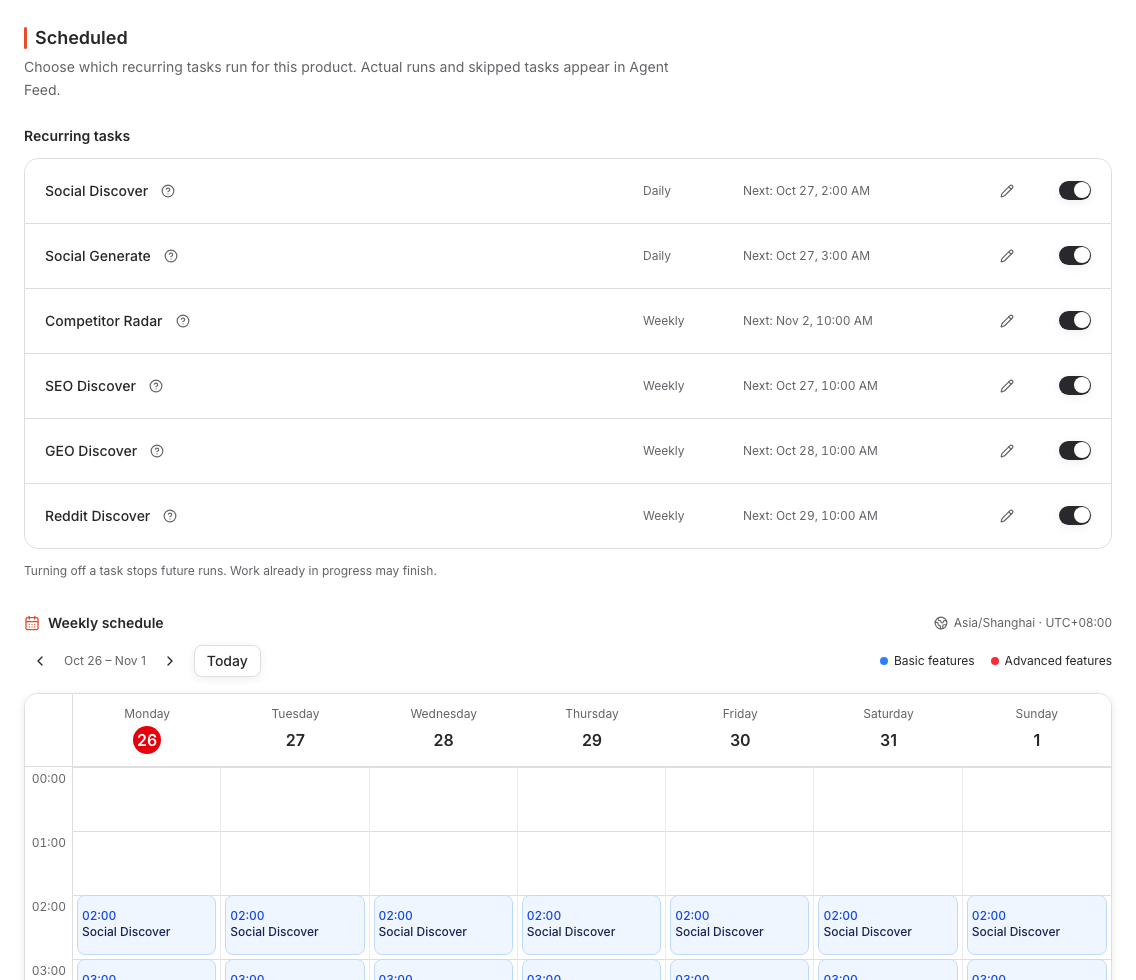
This saved schedule shows when the tasks are due and which timezone the calendar uses. It does not show that a future run has completed.
Change when a task runs
Choose the task's Edit schedule action. Set a valid future First run, check the displayed Time zone and Repeats cadence, then choose Save schedule. Check the task's next time after saving.
The editor uses the task's execution timezone; the weekly calendar displays times in its own shown timezone. Compare the timezone labels when the same run appears at different local times. The task keeps its displayed daily or weekly cadence when you move its first run.
You can also move a task in the weekly calendar where the drag action is available. Check the resulting time after saving. If a change fails, check the next run shown before retrying it.
Editing a task that is off does not turn it on. Save the timing, then enable its switch if you want it to run.
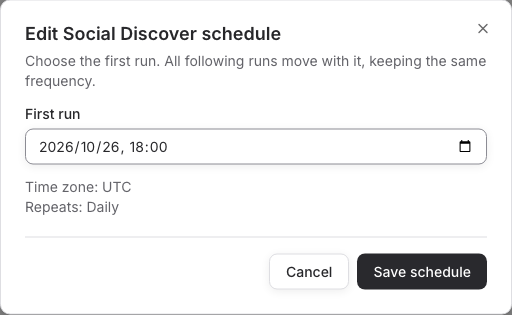
The editor above uses UTC, while the calendar in the previous screenshot uses Asia/Shanghai. Read both timezone labels when comparing the same run.
Keep task schedules separate from publishing
| Schedule | Controls | Where you change it |
|---|---|---|
| Recurring task | When research or Social generation runs | Scheduled |
| Social channel slots | When approved posts are placed in the channel's publishing queue | Social Agent → Channels → Schedule |
| SEO or GEO article publication | The confirmed article's publication date and window | The article's publication or approval action |
Turning on Social Generate does not approve its drafts. Changing a research task's time does not change when an approved post publishes. Reddit's current Submit for delivery flow does not provide an exact-hour scheduler.
Set up Channels & Connections for Social publication and use Review & Publish to approve the saved content and destination.
Turn work off or pause the product
Turn a recurring task's switch off to stop its future scheduled runs. Its saved research and content remain available. Turning off discovery or generation does not remove posts already approved for publication; manage those in the relevant Workflow.
For a broader pause, open Product settings and choose Pause. A paused product's recurring tasks are blocked, and Social automatic publishing requires the product to be active. Use Resume when you want to continue, then check the task switches, next times, and approved publishing queue.
Neither changing a schedule nor pausing the product recalls content already sent to an external destination. Use the content's available cancel, withdraw, or revert action when you need to change a publication decision.
Understand why a task is not running
| State | What to check |
|---|---|
| Off | Turn the switch on when you want future runs. Saving a schedule alone does not enable it. |
| Upgrade to enable / Paused: plan upgrade required | Check the capability included in your plan before enabling or resuming it. |
| Paused: no credits available | Open Billing and resolve the credit condition shown. |
| Paused: product is inactive | Resume the intended product, then check its task settings again. |
| Could not save this change | The previous setting was restored. Retry the setting change and verify the saved result. |
| No calendar tasks are ready to run | Check the switches and each task's status above the calendar. |
If Social has no new draft, check whether there are selected topics available for generation and whether Social Generate is enabled. If an SEO, GEO, or Reddit opportunity exists without content, open it and make the generation choice; discovery alone does not write the finished contribution.
For a failed run, missing image, or uncertain publication, follow Troubleshooting. Pricing & Credits explains plan access and usage; Marketing Workflow shows how to return to saved work and continue.