
Start with a question your customer would ask
In your product's Console, open GEO Agent → AI visibility. Monitoring collects answers to your saved buyer prompts across ChatGPT, Gemini, and Perplexity. It helps you check whether those answers mention your product and which sources they cite.
New products need saved buyer prompts and a monitoring run before there is evidence to inspect. Running GEO requires Growth access and sufficient credits. Check the monitoring task in Scheduled; Scheduled Tasks explains its controls, and Pricing & Credits explains usage. Reading an existing answer does not start a new monitoring run.
Begin with one relevant question. Read its research, then inspect the captured answer and sources. This gives you a more useful starting point than judging the product from one percentage.
Read the overview with its filters
Choose 7 days, 30 days, or 90 days and an AI engine, or All engines, on Overview. The visibility percentages and owned citations describe observations in that period and engine selection.
| Metric | What it tells you | What to check |
|---|---|---|
| Category visibility | The percentage of analyzed results that mention your product when the question does not name it | Whether the monitored questions represent the problems your customers actually research |
| Branded visibility | The percentage of analyzed results that mention your product when the question already names it | Keep it separate from category visibility; a question naming you is a different test |
| Owned citations | Recorded citations of your own website in answers to category questions | Open the cited URL to see which page appeared; this is a count of references, not visitors |
| Active prompts | Buyer questions currently enabled for monitoring, including questions not checked yet | This is your current question inventory, not the number of completed checks in the selected period |
A visibility result counts once whether it names your product once or several times. Confirmed no-answer results with completed analysis count as no mention. Failed requests and unfinished analysis are excluded from visibility, so a small set of completed checks can produce a percentage while other checks remain unresolved.
The chart shows measured changes over time. A gap or Not measured is different from 0%. Compare question coverage, engines, dates, and available evidence before interpreting a rise or fall. The page also warns when monitoring data is over two weeks old.
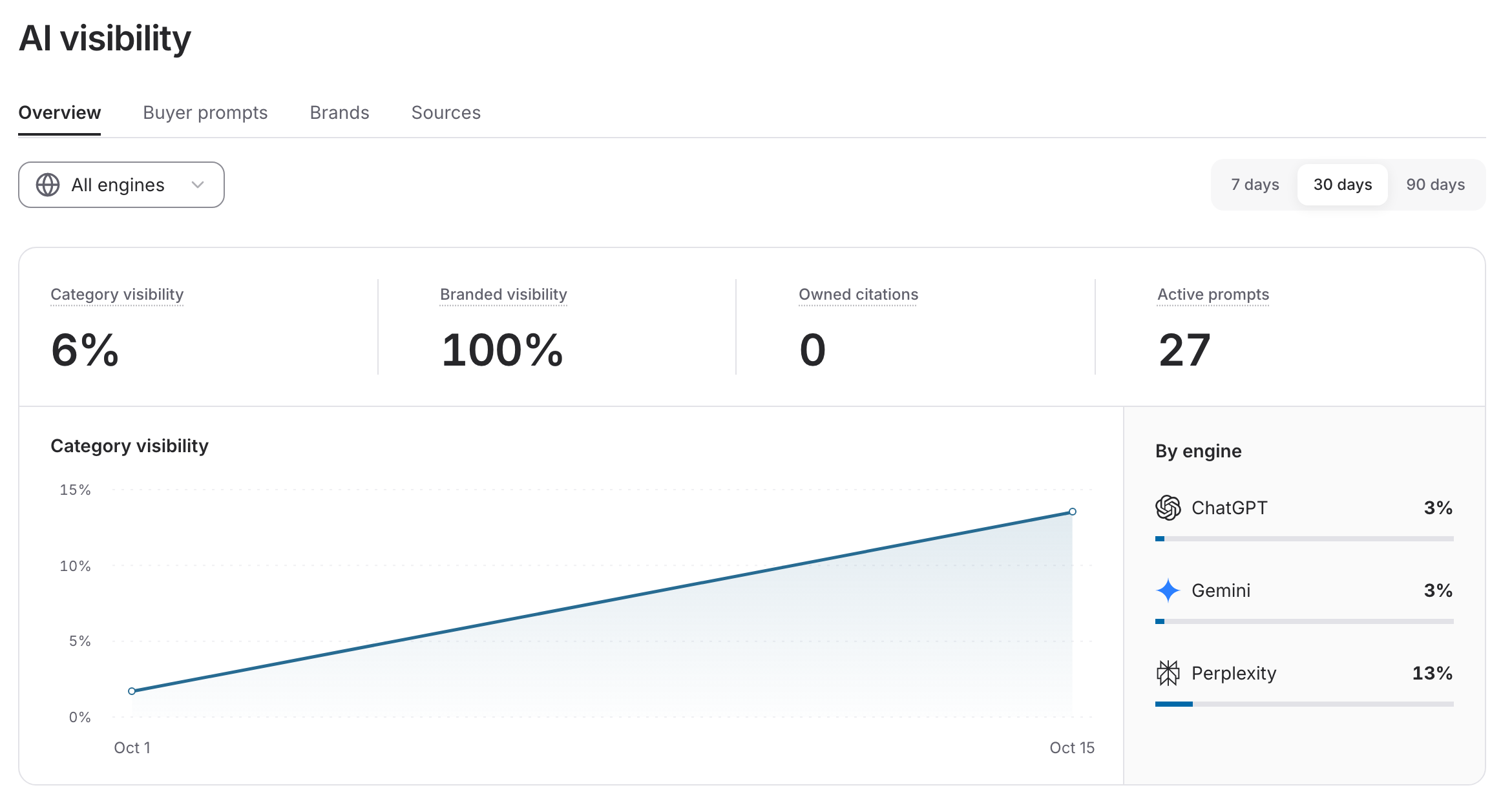
This saved overview shows the selected period and engine scope alongside four different measures. These are observations from this product's monitored questions, not expected results for another product.
Open the answer behind a number
- Open Buyer prompts. Search for a question, or filter Category questions, Branded questions, status, and topic.
- Select the question. Read Research, including why it was selected, buyer need, product fit, sources, and any recorded gaps. Research notes and interpretations are not the same as an engine's captured answer.
- Under Captured answers, choose the date range and engine. Check the model, timestamp, and status, then choose Read full answer.
- Inspect Brands mentioned and Cited sources alongside the text. Open a citation to verify the page. Your page identifies a source belonging to your site.
The Buyer prompts table uses the latest check for each engine, excluding failed or unfinished checks from its visibility percentage. It is not a historical average for the overview's date range. In the question detail, the date control selects the period for captured answers; widening it can reveal older evidence, but does not make that evidence fresh.
Use Archive in a question's detail when it is no longer relevant. Archived questions keep their history and stop being monitored. Use Restore to make a question active again; restoration does not immediately fetch a new answer.
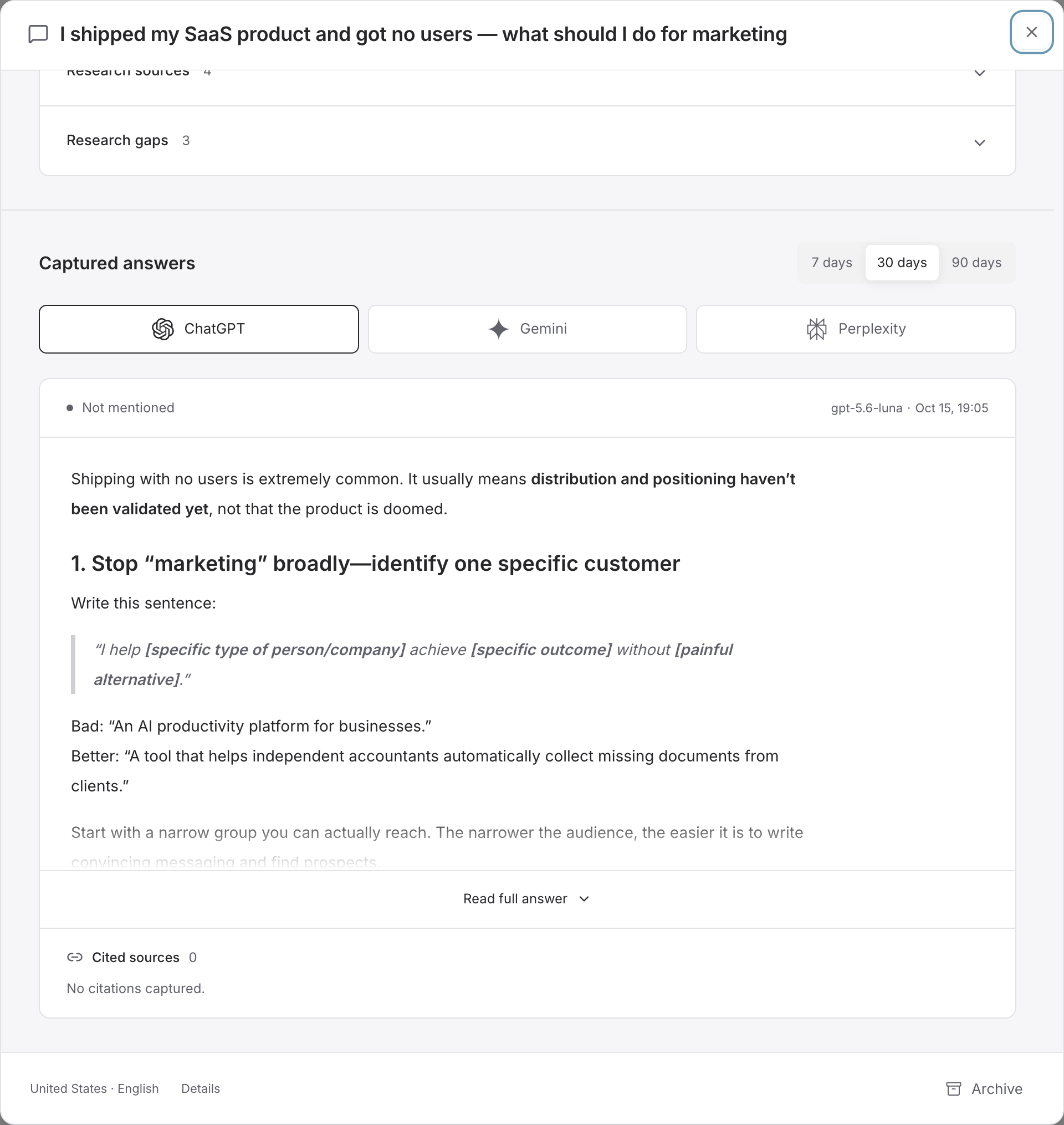
In this observation, an answer was captured but it did not mention the product and had no recorded citations. The model and timestamp identify the evidence being inspected; this one answer does not describe every question or engine.
Distinguish no mention from no measurement
| What you see | What it means | Next step |
|---|---|---|
| 0% or Not mentioned | Valid analyzed results exist, but they did not mention your product | Read the answers and assess whether a useful answer or missing product information is worth addressing |
| No branded prompts | No active questions naming your product are being monitored | Review the buyer question inventory; category visibility remains a separate measure |
| Not measured, Not checked, or No answer in this period | There is no qualifying measurement for that selection | Check the question, date range, engine, and monitoring schedule |
| No answer | The engine returned a recorded no-answer outcome | Treat it as no mention when analysis is complete; do not confuse it with a failed request |
| Pending or Analysis pending | Collection or analysis has not finished | Check the task's progress before drawing a conclusion |
| Failed, Skipped, or Analysis unavailable | That check did not yield a usable analyzed result | Inspect the error and task state; if raw text was saved, read it, while treating extracted mentions and citations as incomplete |
No citations captured means no citations were recorded for that answer. It does not establish that no website influenced the answer. A page-level Couldn't load error is a read failure, not evidence that your product disappeared; use its Retry to reload the saved results. For an unresolved run, follow Troubleshooting.
Compare brands without changing the question
Open Brands and select a brand to inspect its engine results and how the answers describe it. This view covers both category and branded questions across engines for the selected period. The overview's Brands across all questions summary uses that same broader scope, even when you select one engine for the overview metrics.
- Visibility counts the share of analyzed results naming that brand; Rank orders brands by this measure.
- Share of voice is the brand's share of mentions among tracked brands. Repeated mentions count, so it is different from visibility.
- Prompt coverage is the share of active buyer prompts with an analyzed answer mentioning the brand in the period.
- Avg. mention order describes where a brand first appears among distinct brands in an answer. Appearing earlier does not establish a stronger recommendation.
- Sentiment summarizes scored descriptions from negative to positive. Answers that only name a brand are not scored. Read the answer before acting on the score.
Use Tracked, Suggested, and Ignored to manage comparisons. Suggested brands need review; ignored brands are excluded from comparisons while their history is kept. Your own brand is always included. Changing the tracked set can change share of voice without any new answer being collected.
This is evidence about the questions you monitor, not a complete market ranking. For competitor launches, pricing, and positioning research, use Competitor Radar.
Inspect sources and choose a next step
Open Sources and switch between Domains and URLs. Citations counts recorded references; Share divides that count by all recorded citations in the period. One answer can cite several sources.
The overview's Cited sources summary counts category answers citing a source for its selected engine and period. All sources and source detail show all buyer questions and engines in the period, so their totals can differ from the overview. Open a domain to inspect its cited URLs. Retrieved and Not cited, when present, describe recorded retrieval activity; missing retrieval records do not prove a page was never read.
After checking the evidence, choose a concrete next action: correct inaccurate product knowledge, investigate a relevant question, or select a researched brief in GEO Workflow to write a useful article. Review and approve publication separately.
A published article, a product mention, a citation, and a new customer are different outcomes. A later visibility change does not by itself prove that one article caused it. Use the saved question, engine, answer date, and source URL to explain what you observed. Export CSV in Buyer prompts, Brands, or Sources lets you keep the available records for your own review.
Watch the saved-results walkthrough (MP4). This silent Console recording opens the overview, buyer questions, research, and an existing captured answer. It shows how to inspect saved results; it does not run monitoring or publish content. The steps above provide the written explanation.