If a small team is buying an AI marketing tool, ask to see two things. Can you check the evidence behind the suggested topic? After you review the draft, can the tool put it where customers can see it? The answers tell you how much research and publishing work you will still need to do.
Compare the tools · Published example · Pricing · FAQ
Short answers
Which AI tool is best for marketing?
Choose RiseMore for ongoing research and publishing across SEO, GEO, Reddit, and Social. Pick Blaze when the team needs a shared calendar for its connected accounts, Writesonic for search articles and AI visibility reporting, or StoryChief for editorial review and distribution across a CMS and social accounts.
Does AI marketing actually work?
Yes, when the tool carries a useful idea through to a piece customers can find. RiseMore turned a saved search opportunity and brief into a published article. The live URL verifies delivery. To judge growth, follow what people do after finding it, including visits and enquiries.
Key takeaways
- Check how each tool finds a topic. RiseMore shows keyword estimates and source material. Averi makes it easier to connect an idea to an editorial plan. Xicmo can surface keywords and Reddit threads for review.
- Check the handoff by destination. Blaze can schedule to WordPress and LinkedIn. Writesonic can send an article to WordPress, with LinkedIn publishing handled separately. Xicmo connects to a CMS and documents a manual posting step for LinkedIn.
- Price the approval step. If someone else must sign off before publication, compare Blaze Growth or StoryChief Growth with the starter plans. For RiseMore, budget managed GEO and Reddit publication separately from the subscription.
Compare the six tools
| Tool | Best for | Starting price | Main limitation |
|---|---|---|---|
 RiseMore | Ongoing marketing across SEO, GEO, Reddit, and Social | Free · $20/mo paid Pro, billed monthly | Managed GEO and Reddit publishing starts on Growth and costs extra per item. |
 Blaze | Planning and scheduling campaigns across channels | $79/mo Starter, billed monthly | Formal approvals require Growth. |
 Writesonic | Writing SEO articles and tracking AI visibility | $99/mo Starter, billed monthly | LinkedIn publishing is a separate step. |
 Averi | Turning research and brand context into an editorial plan | $99/mo Solo, billed monthly | Teammate access and role controls require Team. |
 StoryChief | Coordinating editorial approvals and publishing | €588/year Starter, billed annually | Formal approvals require Growth. |
 Xicmo | Finding SEO and Reddit opportunities in one workspace | $49/mo Lite, billed monthly | LinkedIn and Reddit posts are published manually. |
Prices checked on November 19, 2026. See full pricing and billing details.
From keyword research to a published article
Our September 27, 2026 research identified content marketing for saas. The saved US English estimate was 590 monthly searches, with keyword difficulty of 2 out of 100. We used that topic to help founders keep publishing when they have no marketing team.
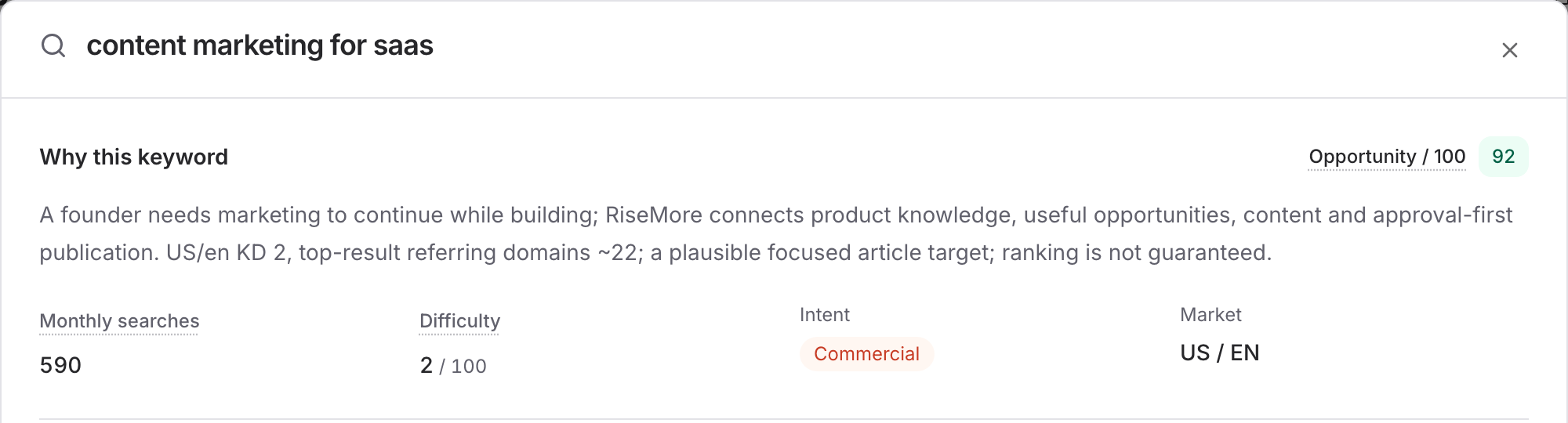
The saved brief narrowed the audience to SaaS founders without a marketing team. It proposed a repeatable way to keep publishing during product work. That gives an editor something concrete to review. A list of popular marketing channels would leave that reader picking among options. A weekly process answers how to choose one useful piece of work and make time to finish it.
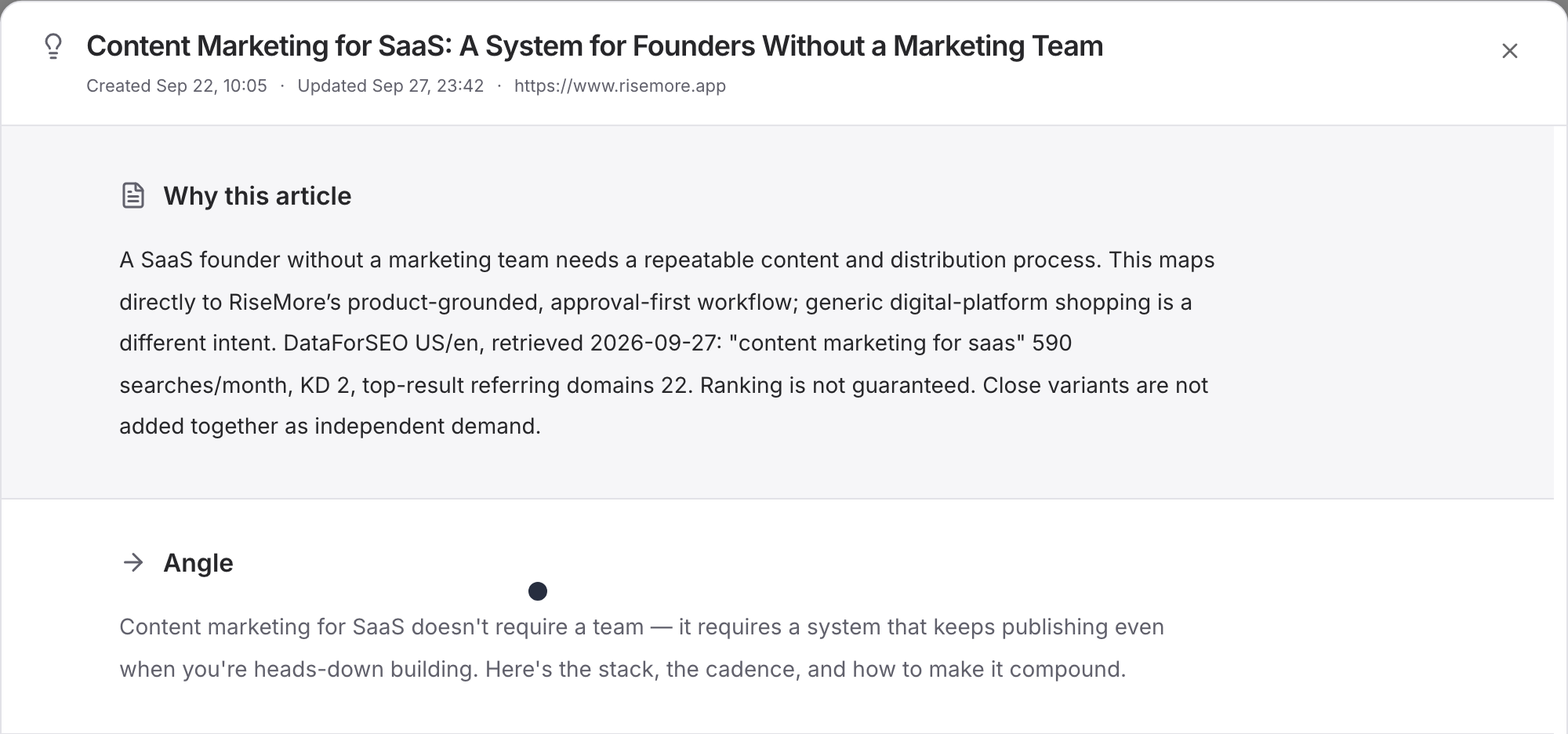
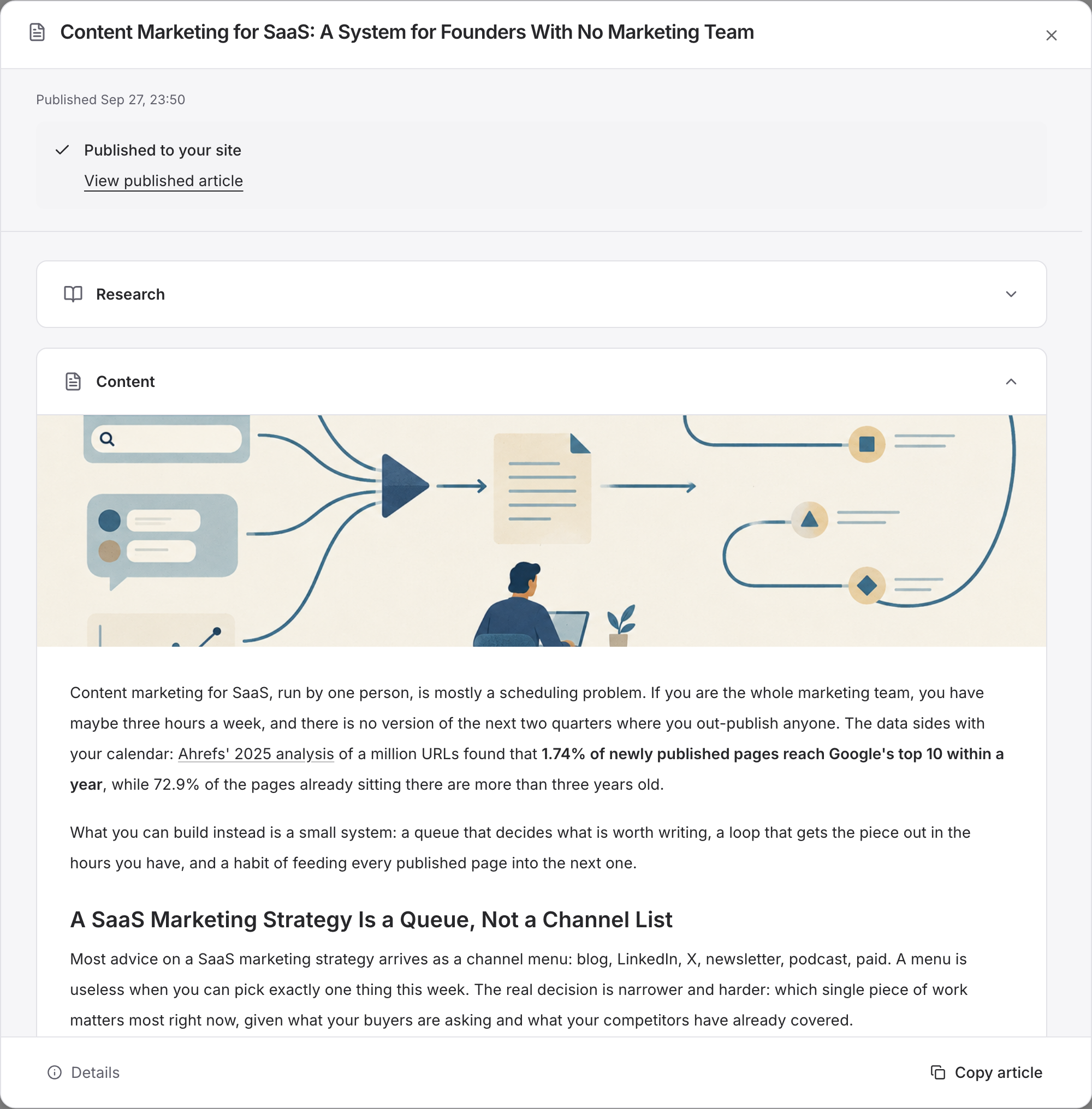
The resulting guide gives founders a three-hour weekly process for choosing, researching, and distributing one piece of content. You can compare the research with the actual output at the published article on the RiseMore blog. The publication URL is the verifiable delivery in this example. For a connected WordPress site, follow the documented site setup and publication checks. WordPress publishing workflow.
How we compared them
The shared assignment starts with RiseMore's public website and an audience of founders building a software business. Find a search question about keeping up with marketing on a small team, use the website and inspectable sources to write a useful answer, then move the reviewed article to a site that customers can access. Check whether the tool can also adapt one point for LinkedIn or find a relevant community discussion. If a tool needs a topic from the operator, provide content marketing for SaaS and continue from there. The historical RiseMore case above used that keyword.
We asked the same two questions of each workflow.
- Can you check why this is worth writing? Look for a searchable keyword or buyer question, an original thread or another source you can open, and a reason it matters to your audience. Record which of those the tool finds and which you have to supply.
- What reaches the customer after review? Record the destination, the publishing access you need, who makes the final change, and where you can find the live URL. An editorial comment, an approved draft, and a live post each tell you something different.
RiseMore makes this comparison. We can show the saved research, brief, and publication for the RiseMore example. The five alternatives are assessed from their official workflows, product screens, and plan documentation. Where we describe what an editor would do next, it is a walkthrough of the documented path. The comparison reports capabilities and handoffs. Time saved, content quality, and changes in traffic require separate measurement.
1. RiseMore for ongoing marketing across four channels
RiseMore learns what your business sells, who it helps, and how it talks about its work. Its SEO Agent finds keywords and drafts articles for WordPress. The GEO Agent researches buyer questions and tracks mentions and citations in AI answers. The Reddit Agent finds relevant discussions and drafts a post or reply. The Social Agent turns business updates and other relevant material into posts for X and LinkedIn. Each channel has its own publication workflow. See the RiseMore marketing workflow.
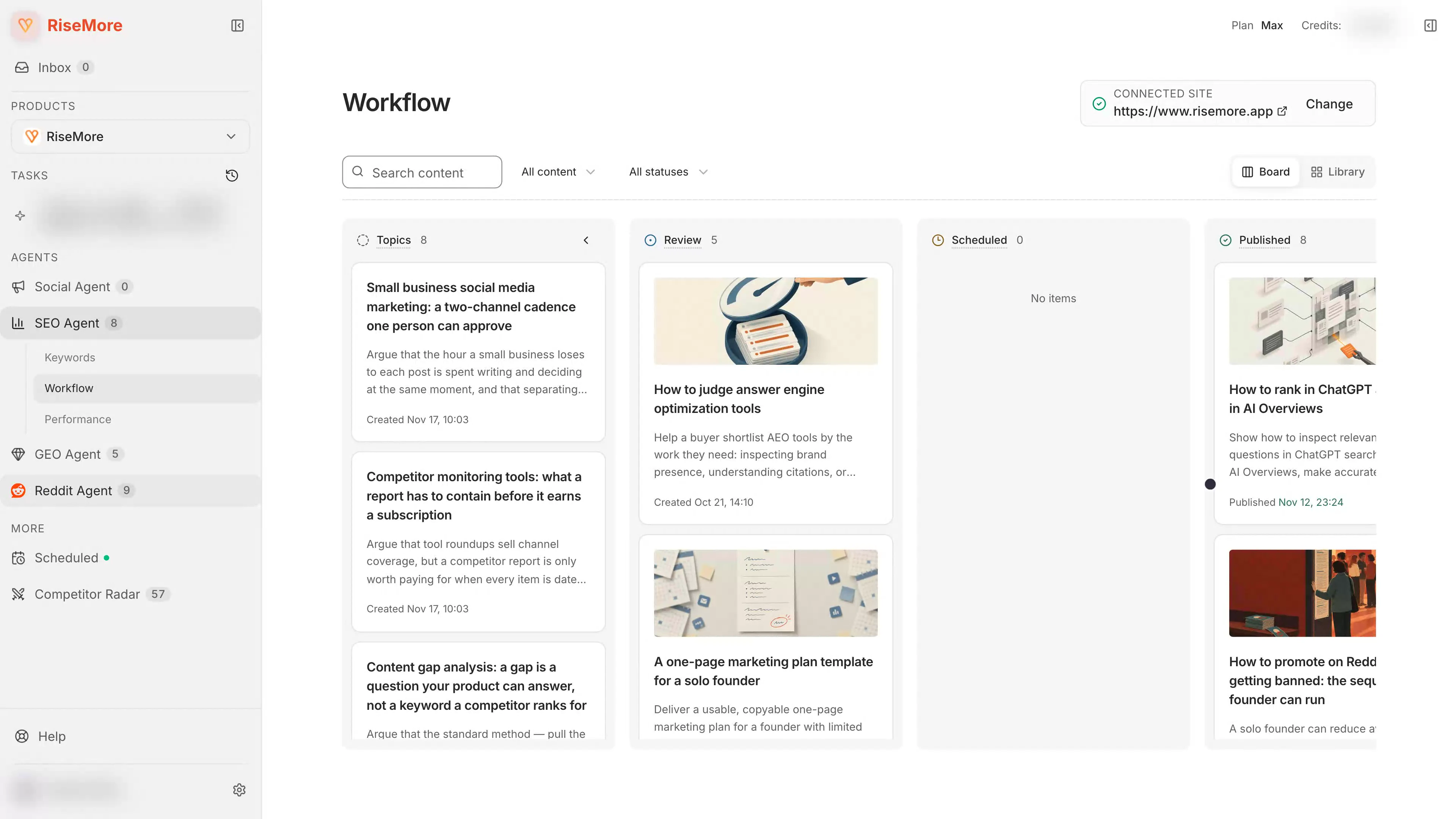
For this assignment, the team can inspect a keyword and its rationale, choose an article topic, and publish the reviewed piece to its connected WordPress site. Social posts go to connected X or LinkedIn accounts. Growth, Scale, and Max let the team work from a Reddit thread or a GEO brief and request managed publication, including GEO articles on Medium or DEV.to. SEO Agent · Social Agent · GEO Agent · Reddit Agent.
How the brief would move through RiseMore
Give the workspace the homepage and notes about the audience and the product's publishing workflow. Under Product Knowledge, check what the system learned about who the business serves and what customers can expect. Correct any inferred service, eligibility promise, or price before it ends up in a draft. That record is available the next time the team creates content. Product Knowledge guide.
For the article, start in SEO Keywords and inspect what people search for, the search intent, and the reason an opportunity fits the business. Choose an article topic, then review the draft and cover before scheduling on the connected WordPress site. For LinkedIn, use the Social channel's own voice and the source details from the business. Review the post in the Social workflow, confirm its destination, then schedule or publish it. SEO workflow · Social workflow.
For a relevant buyer question in GEO, the team can monitor AI answers before choosing what to write. It can use the research to pick a brief, review the article, and confirm the publication destination separately. For Reddit, a useful contribution begins with reading the actual thread and identifying what its existing answers leave out. Publication on those two lines can be requested on the business's behalf. Look at those options when the audience is there and the material is a good fit. Read AI visibility results · Reddit publishing.
After publishing, use the report that matches the job. SEO can pull page and query performance from connected Search Console. GEO preserves the answer, engine, and sources for a monitored question. For Social, open the actual post and inspect supported X engagement in RiseMore. Pull LinkedIn metrics from LinkedIn when you need them. For Reddit, start with the resulting permalink and the conversation around it. What each agent reports.
Plan and fit. Free gives you a way to see product research and a first Social draft. Choose Pro for recurring WordPress and Social work. If the workload includes GEO or Reddit, compare the allowance in Growth, Scale, and Max with the number of products and topics you need to cover. For an Instagram-led store or a team on a different CMS, check the destination before you commit to a workflow. RiseMore's direct Social connections are X and LinkedIn. RiseMore plan and destination details.
2. Blaze for a multi-channel content calendar
Blaze combines brand-voice content creation, campaign planning, and scheduling. It can populate a calendar with posts and articles, then deliver them through connected destinations. For the buying scenario, WordPress and LinkedIn are both documented. A team that needs an approval queue should compare Growth with Starter. Blaze pricing and features · Social scheduler · WordPress setup · Growth approvals.
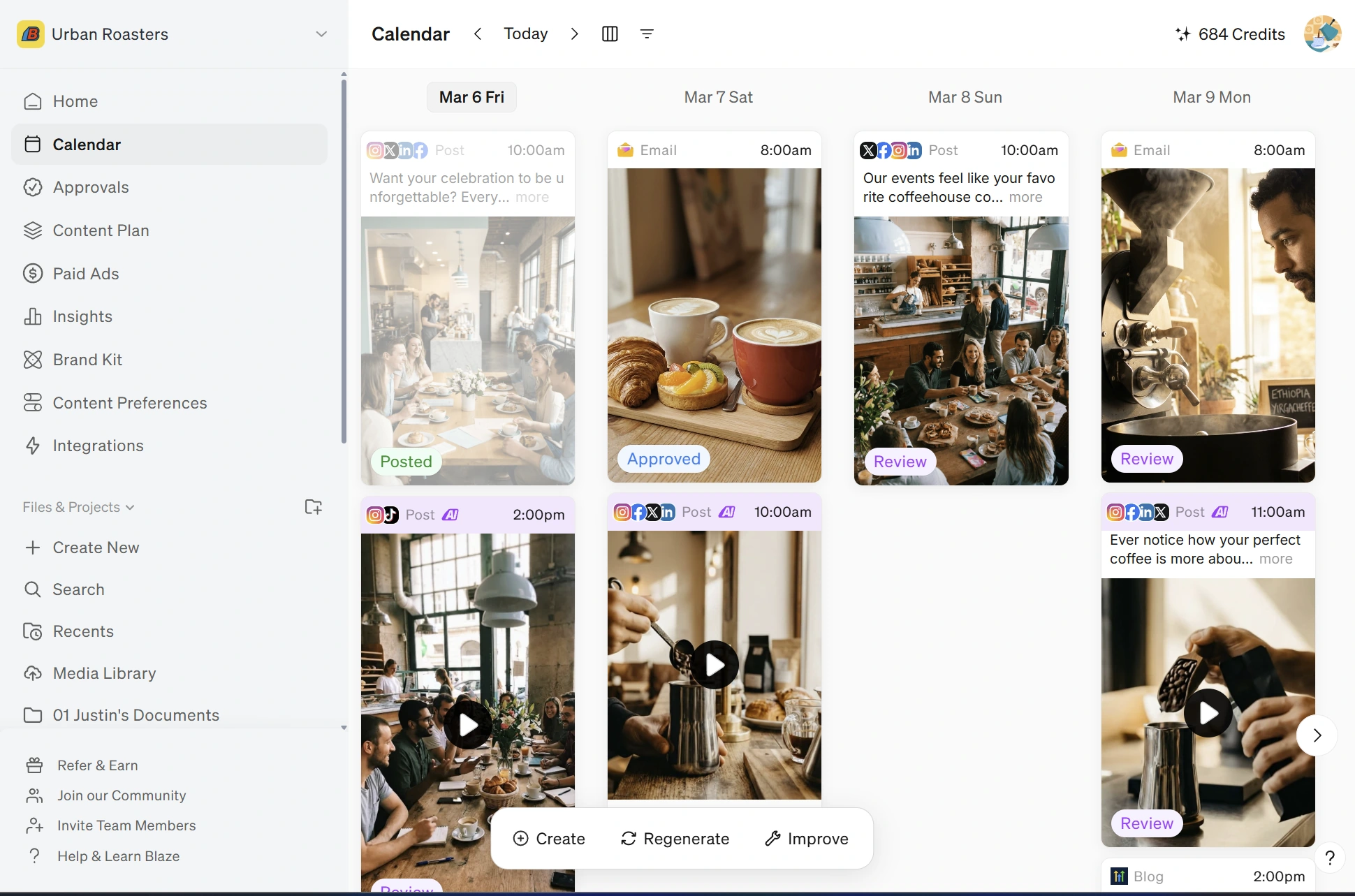
For the shared assignment, start with the public product page in Copilot's website-to-content workflow and give it the selected search question. Blaze analyzes the page, lets you choose the formats and a saved Brand Voice, and creates the pieces together in a project. Keep the article focused on a founder's weekly publishing routine. Use the shorter LinkedIn draft to explain one decision in that routine. The editor can check both pieces against the business's own notes and inspect the source before adding either item to the calendar. Website-to-content guide.
To plan a recurring week, set a campaign goal and frequency by channel. The campaign can use a URL, document, or other uploaded context. Starter supports one future campaign and Growth supports more. Check whether the workspace is using Copilot for individual projects or Autopilot to generate a campaign before judging what the workflow saves you. Blaze campaign guide.
Where the handoff happens. Add WordPress and LinkedIn as separate destinations. The WordPress setup requires access to install the plugin and create an application password. Before confirming, check the article's slug, featured image, tags, and destination. On Growth with Approvals enabled, an approved item can post at its scheduled time. Returning it to the project sends it back for editing. Inspect Insights after publishing for supported social, email, or configured website data. WordPress publishing · Approvals · Insights.
Plan and fit. Starter makes sense for one operator with up to three posting accounts. A fourth account, a second workspace user, or a formal review queue changes the decision even if there are plenty of generation credits left. Each brand needs its own separately billed workspace. That matters for an agency running the same calendar process for several clients. Plan allowances · Multiple brands.
3. Writesonic for SEO articles and AI visibility
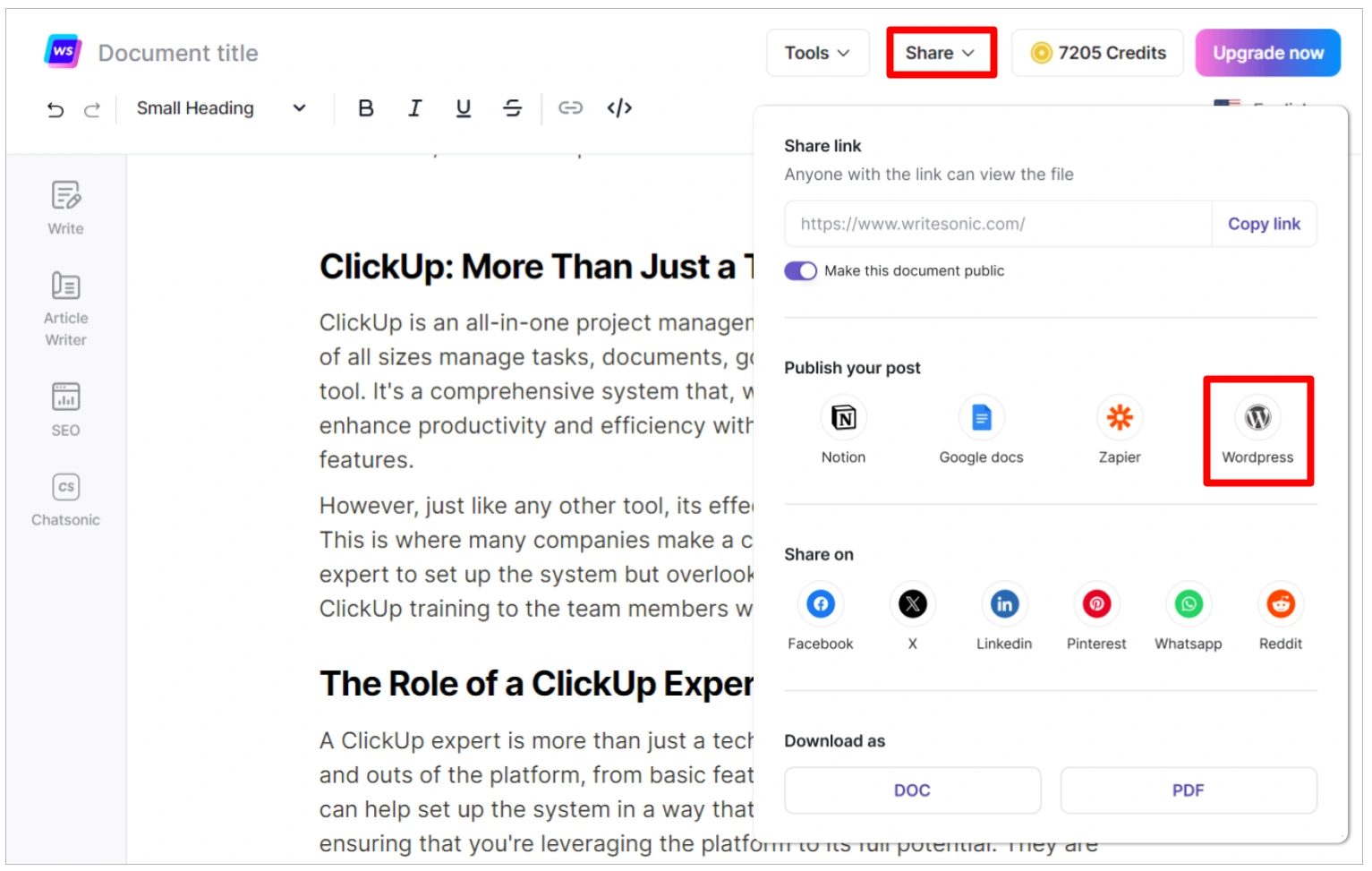
Writesonic combines keyword and content research, an article editor, and tools for checking visibility in AI answers. Starter includes WordPress and Google Search Console integrations and up to 50 tracked prompts across supported surfaces such as ChatGPT, Gemini, and Google AI Overviews. You can send the article from the editor to WordPress.org. Use your preferred scheduler for the companion LinkedIn post. Writesonic plans · WordPress publishing.
The guided Article Writer is useful when an editor wants to make decisions before a long draft exists. Start with the question and target keyword, search for sources or provide your own links and files, choose the references to use, then review the outline. For the shared assignment, include the business's actual publishing steps and examples alongside the search results. Use those first-party materials for claims about what a customer can do with the product. Use the search results to see which parts of the question the market already answers. Guided Article Writer workflow.
Where the handoff happens. In a connected WordPress.org installation, the editor can create a post or update an existing one. For a new test article, first check the target site, slug, metadata, and publication status. On a refresh, verify the existing post you selected. The documented update path replaces that selected article. Once the post is live, open the resulting URL and check the title and body in WordPress. The editor may still need to move the separate LinkedIn asset into a scheduler. WordPress integration guide.
In the AI visibility workspace, the Prompts view helps identify questions to investigate. The Answers view lets a team inspect the answer, the date, its platform, and the brands mentioned. Those results answer a different question from Search Console. For the same article, Search Console can show how the page appears and attracts clicks in Google Search, while sampled AI answers show what particular prompts returned. Review dates and platforms before comparing outcomes. Prompts documentation · Search Console performance report.
Plan and fit. Starter is for one user and one project. Its documented limits include 15 AI articles per month and 50 monitored prompts. This can fit a small editorial program. A team with several brands, several editors, or a longer roster of monitored questions should price the plan it would actually use. Check each required engine as well as the overall prompt count. The pricing page specifies the platform coverage by plan. Writesonic plan matrix.
4. Averi for turning research into an editorial roadmap
Averi is a content engine for a small team that wants help deciding what to cover and shipping the work on a cadence. It uses its Brand Core and uploaded knowledge for context. The Strategy Map connects content pillars to focus areas, research, article ideas, and drafts. That structure is useful when someone has to explain why a topic deserves a place on the calendar alongside existing articles. Strategy Map guide.
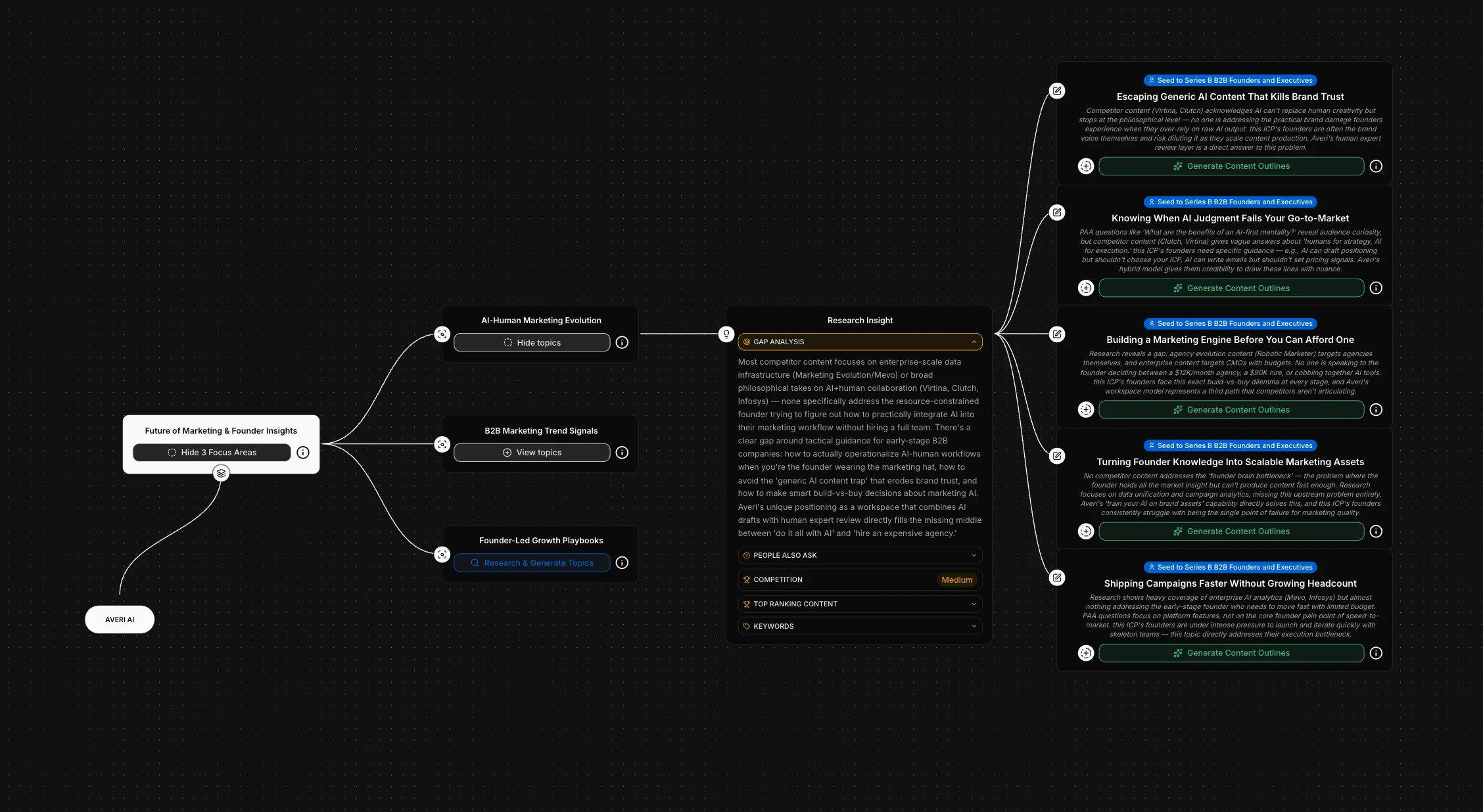
Where the idea comes from. With RiseMore's public site as the input, the item to look for is a new article idea tied to a customer question and the existing coverage of SEO, GEO, Reddit, and Social. Averi's documentation shows a Research Insight view with keywords, ranking pages, competition, and an explanation of the gap. An editor can review the focus area, add guidance to a topic, then generate an outline and check it before requesting a draft. Check the ranking pages and the proposed angle before advancing a topic that overlaps an existing RiseMore article. Research and outlines.
What reaches the destination. Mark the reviewed draft finalized and choose the configured WordPress mode. Draft mode sends the piece to WordPress for another review. Live mode sends it directly and Averi returns a link. The guide also documents an optional scheduling switch for WordPress and calls out SEO metadata limitations with Yoast. For a supporting LinkedIn post, Averi documents publishing to an authorized profile or Company Page with explicit review and approval. If the campaign also needs a Reddit reply, plan that step separately. Check the public article and LinkedIn post from the destination after delivery. WordPress setup · LinkedIn publishing.
Plan and fit. Averi listed Solo at $99 per month and Team at $199 per month on November 19, 2026. Both include research, optimized drafts, scheduling, and CMS integrations. Team adds access for up to three teammates and role controls. Its pricing page lists collaborative editing as coming soon. If review is the constraint, check whether the roles and existing review process cover it before paying for Team. Averi pricing.
5. StoryChief for editorial approvals and multi-channel publishing
StoryChief gives a marketing team one place to prepare articles, review them, and send variants to its site and social channels. Its Starter tier covers AI research and writing, collaboration, and publishing. The Growth tier is the relevant comparison when research starts with the Content Audit or the team needs a formal approval workflow. Draft comments and approval gates have different jobs, especially when a writer and a publisher are different people. StoryChief plans.
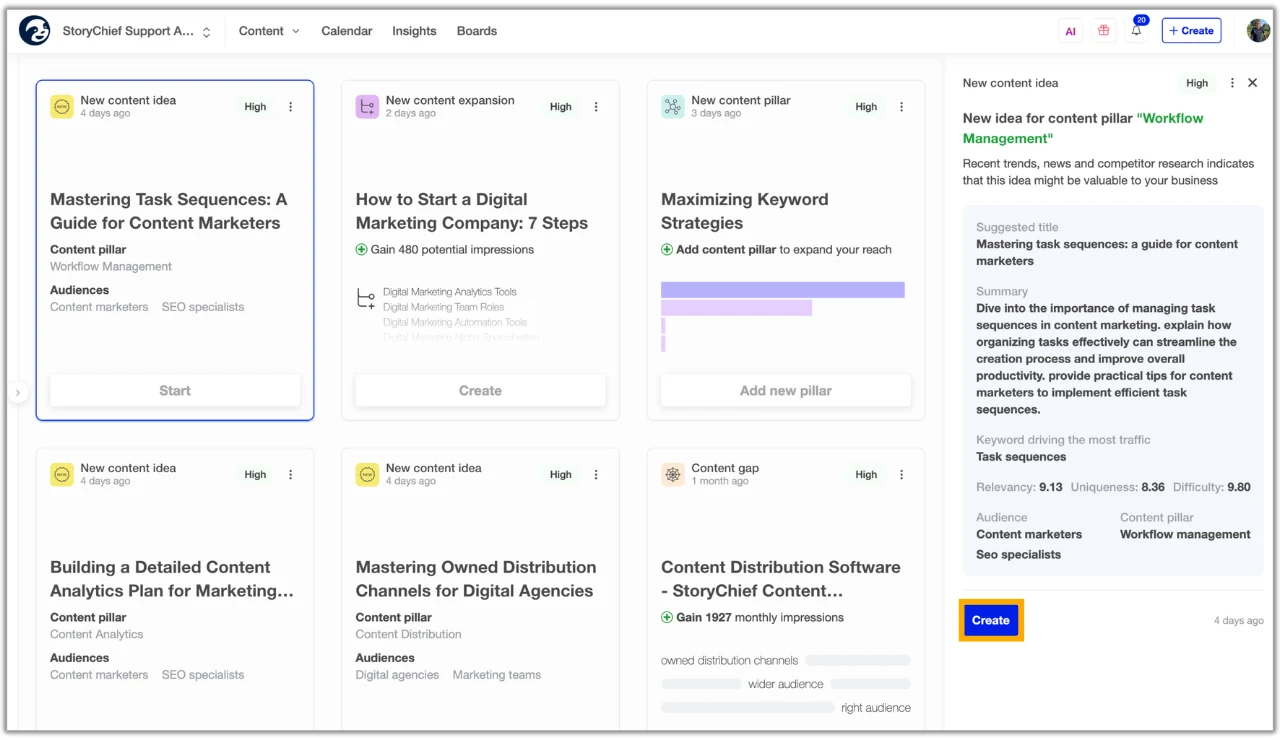
Where the idea comes from. StoryChief recommends setting up its brand strategy and connecting Google Search Console before using the Content Audit. The guidance shows how to inspect the keywords behind a proposed topic, competitor overlap, and why the system thinks it fits a content pillar. With RiseMore's website as the shared input, a reviewer would compare the suggested article against the same already-published pages. The brief should say what the new piece will help a business owner do and why that task is missing from the current coverage. The audit lets a team start a content item from the opportunity, assign it, and edit the result. Its traffic opportunity figures are planning inputs. Content Audit walkthrough.
What reaches the destination. Connect the WordPress plugin and the intended LinkedIn account. StoryChief can send an article as a WordPress draft if testing mode is enabled or publish the article and read back its live URL. It pauses connected secondary destinations when the expected article URL is missing. Use that URL to check the article and tailor the LinkedIn copy before scheduling it. StoryChief also lists Medium and DEV Community as syndication destinations. Check the account, canonical URL, and destination permissions for each one. WordPress publishing and URL receipt · Connected destinations.
Plan and fit. On November 19, 2026 the annual billing view showed Starter at €49 per month (€588 per year) and Growth at €249 per month (€2,988 per year). Growth adds approvals, Content Audit, and AI visibility tracking for ten prompts. Pick the tier based on who has to sign off, how many destinations the team needs, and whether it will use those research and monitoring features. StoryChief allowances and prices.
6. Xicmo for SEO and community discovery in the same workspace
Xicmo shares a business profile across SEO, GEO, writing, social, and community agents. Its documented overlap with this comparison is broad: keyword opportunities, AI visibility monitoring, articles for a connected site, and drafts for Reddit threads and LinkedIn. The destination matters when budgeting the team's time. The workflow for a CMS article has a different handoff from the workflow for a post on a social account. Xicmo agent overview.
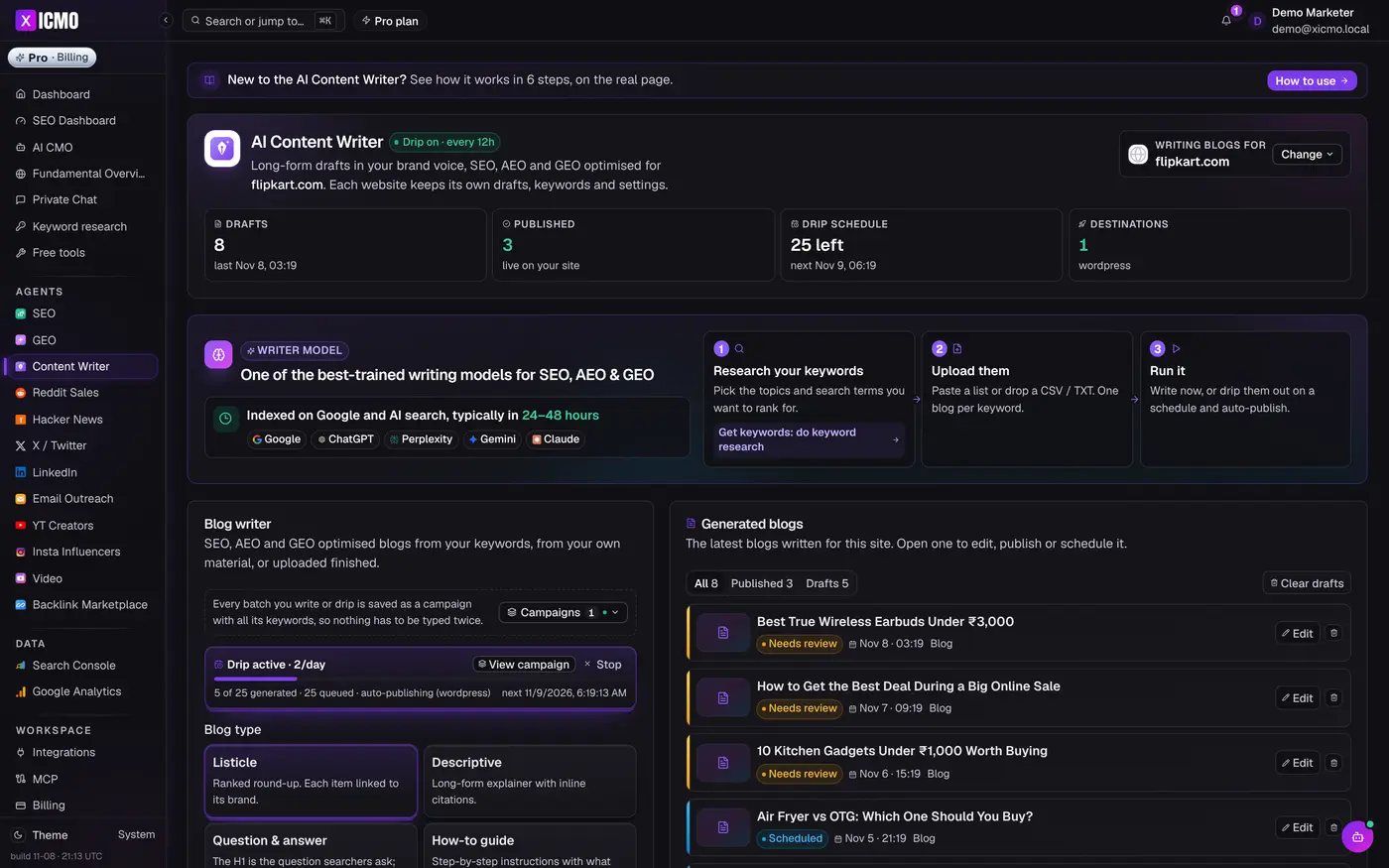
Where the idea comes from. Use the public RiseMore URL to establish the product and audience context. The SEO Agent looks for keyword opportunities and documents traffic estimates by country. The product also connects to Search Console to report changes in actual impressions and clicks. Give the Content Writer the selected keyword you have reviewed. The documentation describes generating the article and adding internal links, followed by reviewing the draft. Check the draft against the public site and the original search results, including any mention of plans or publication destinations. SEO Agent · Content Writer.
What reaches the destination. The Content Writer documents direct publication to WordPress and other connected CMSs. It also documents an optional drip schedule for articles. Verify the live link on the connected site after publishing. The LinkedIn Agent can read a selected profile or company page and propose a draft in the customer's voice. Its dedicated documentation says a person copies the approved draft into LinkedIn and posts it. The Reddit Agent identifies relevant threads and drafts replies for review. A reviewer still needs to read the thread and check the community rules before taking the reply to Reddit. CMS workflow · LinkedIn workflow · Reddit workflow.
Plan and fit. Xicmo displayed Lite at $49 per month with 500 credits on November 19, 2026. Lite includes SEO, GEO, and the AI CMO. Its $159-per-month Standard tier includes 2,000 credits and adds the Content Writer, Reddit, X, and LinkedIn agents. Compare Standard for the full brief and include the person's time to publish approved LinkedIn copy. Credits refresh each month and unused credits expire. Xicmo pricing and credit rules.
What will it cost for your team?
Prices were checked on November 19, 2026. The table shows each vendor's published billing currency and separates monthly from annual commitments.
Published prices by billing term and unit
| Tool | Month-to-month | Annual billing | What changes the total |
|---|---|---|---|
|
RiseMore
| Free $0 Pro $20/mo Growth $60/mo Scale $100/mo Max $200/mo | Pro $200/year Growth $600/year Scale $1,000/year Max $2,000/year | Scale and Max include all four agents with higher allowances. Managed publishing costs $5 per GEO article, $20 per Reddit post, or $10 per Reddit comment. |
|
Blaze
| Starter $79/mo, Growth $149/mo | Check the current offer | Starter includes one user and three posting accounts. Growth includes unlimited users and ten posting accounts. |
|
Writesonic
| Starter $99/mo | Starter $948/year, equivalent to $79/mo | Compare the limits on generated articles, audits, and tracked AI prompts. |
|
Averi
| Solo $99/mo, Team $199/mo | Check the current offer | Team adds teammate access and role controls. Check availability of collaborative editing before buying for a review team. |
|
StoryChief
| Check the monthly offer in your region | Starter €588/year, Growth €2,988/year | Starter covers editing and publishing. Growth adds formal approval, Content Audit, and ten tracked AI prompts. |
|
Xicmo
| Lite $49/mo, Standard $159/mo, Pro $199/mo | Current page lists monthly plans | Standard adds Content Writer publishing and the social and community agents. Pro increases the monthly credits. |
Compare the cost of the whole assignment. A RiseMore Growth user publishing one managed GEO article and one Reddit comment would budget $75 before taxes and additional AI usage. That includes the $60 subscription and $15 in publication fees. A Blaze user who needs a formal approval queue would compare Growth, even with one site and one social account. Add the cost of any CMS, scheduler, or other service your team needs to finish the work.
Price the constraint that will make you upgrade
Start with the number of people and outputs. A founder and a reviewer are two people even if they manage one account. A founder profile, a LinkedIn Page, and an X account are three social channels. A subscription can be inexpensive for one operator and require a different tier when another person needs publishing access.
Next, count the capacity the job needs. For RiseMore Growth, Scale, and Max, the feature set includes all four agents. Larger plans raise the number of products and monitoring targets you can maintain. A team tracking 50 AI questions on one product would look at Scale's per-product allowance, even if it had only one site and two channels. Include recurring monitoring and occasional managed publishing when budgeting. RiseMore monitoring allowances.
Compare annual amounts as cash commitments. Writesonic Starter at $79 per month with annual billing is $948 for the year. StoryChief displays the annual commitment in euros on its pricing page. Use the checkout currency and billing term for your budget, and check which plan allows the team to review and ship at its expected volume.
Run a one-week pilot before you buy
Pick one prospect question from a real email or call, add a link to your product or service page, and write down two concrete details the final piece needs to preserve. Use the same brief for the tools on your shortlist. Choose one site page and one channel, then record what each product actually delivers to those destinations.
- Capture the source. Can you open the material behind the suggested topic? Choose one important claim in the draft and check it against the original page or business notes.
- Track time spent editing. Record the minutes from usable source material to a version your reviewer would approve. Include corrections, rewrites, and moving content between tools.
- Check the publication handoff. Note who needs access, which account will post, and whether the tool creates a draft, schedules the piece, or returns a live link. After publishing, open the destination outside the editor and compare it with the reviewed version.
- Record the result and the date. Keep the final URL, the planned follow-up date, and what the channel can report. Use the same check when the next content piece goes out.
At the end of the week, compare one tangible result from each option. A channel link shows the post reached its destination. Later, Search Console can tell you which queries led to impressions for a website page. In an AI visibility tool, check whether the page was cited in sampled answers to the same question, and keep the engine and dates with the observation. These checks help you decide what to improve on the next piece without losing track of the original brief.
FAQ
Can I start with a free AI marketing tool?
Yes. Use RiseMore Free to inspect the research and first Social draft for your own website. Other vendors offer trials with different account and publishing limits. If the task requires WordPress publishing, multiple reviewers, or AI visibility, check the trial plan for each step you need to see.
Can one tool cover WordPress and LinkedIn?
RiseMore, Blaze, and StoryChief document connections to both. Averi also documents publishing to a LinkedIn profile or Company Page. Confirm that your team has access to connect the WordPress site and the type of LinkedIn account you plan to publish to. Then check the review step required for each destination.
Which AI marketing tools support team approvals?
Blaze Growth and StoryChief Growth both document formal approval workflows. StoryChief Starter supports comments and shareable review links. If one person writes and another signs off, ask the reviewer to return a draft and approve the revised version before you choose a plan. Blaze approvals · StoryChief plan details.
Can these tools suggest a topic if I don't have a keyword?
Yes. RiseMore can suggest keyword opportunities from the business and its audience, Averi can propose article ideas from the gaps it finds in a content strategy, and Xicmo can surface SEO opportunities after reading the site. Open the research or original search results before picking a topic, and check that your site has room for a useful new answer. RiseMore keyword discovery · Averi Strategy Map · Xicmo SEO Agent.
Can an AI marketing tool help me publish on Reddit?
RiseMore can find a relevant thread, draft a contribution for review, and publish on your behalf through its managed service. That service is available on Growth, Scale, and Max, with separate fees for a post or comment. Xicmo documents thread discovery and reply drafting for user review. For either workflow, open the original thread and check the community's rules before deciding whether to contribute. RiseMore managed Reddit publishing · Xicmo Reddit Agent.
How do I check whether GEO work is helping?
Keep a small set of customer questions and record the answers before publishing. When you check again, use the same questions and engines, note the dates, and open the cited links. A mention tells you that the brand appeared in an answer. A citation shows which URL the answer referenced. Compare those observations separately from actual visits and enquiries.
Start free with your website to see what RiseMore learns and review your first social draft.